This week, I placed my animated clips on screens in the black box theatre in Unity. I started with one screen directly in front of me and tried different distances in the headset. When the screen was too close, it was hard to see the whole frame at once. When it was too far away, small details like a character’s movement or the light from the Silmarils were harder to see. I wanted the viewer to see the edges of the stage and still have a clear view of the action.
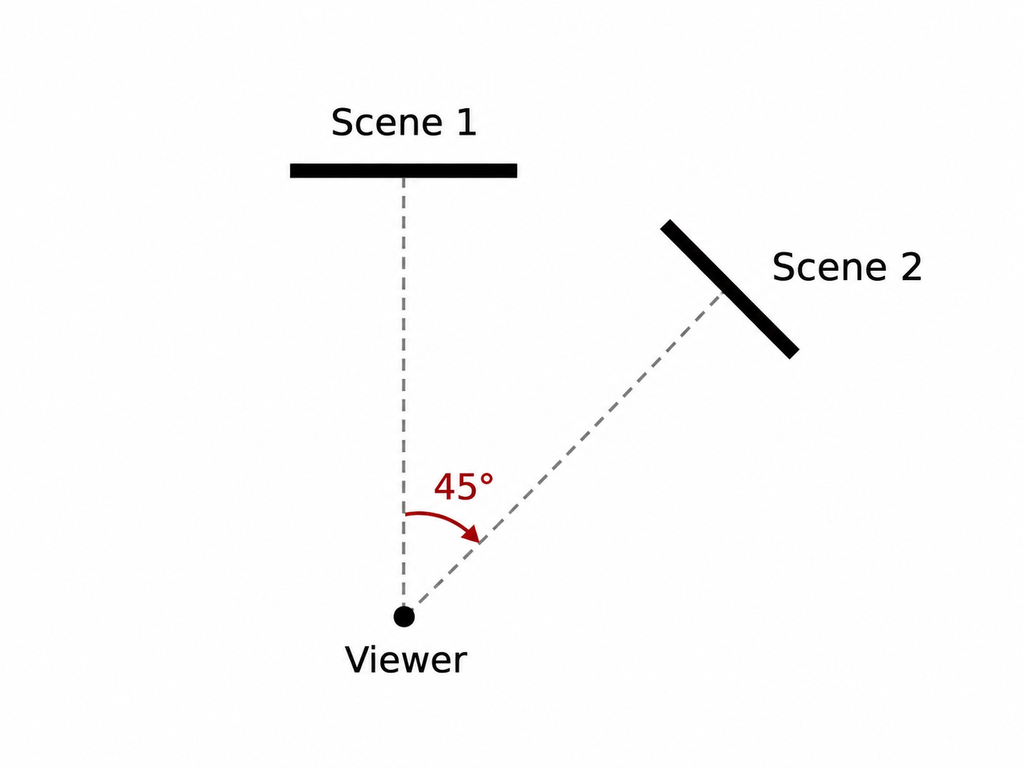
Next, I placed a second screen to the right of the first and replayed the change between the two scenes. From my position in the centre, a turn of about 45° felt comfortable. When the first scene ended, I could turn my head to the right and find the next one easily. The turn also gave me a clear sense that the performance had moved to another part of the theatre.
Based on this test, I chose to place each new screen about 45° to the right of the one before it. The screens stay fixed in the theatre, so the viewer can follow the story from one spot by turning their head.
Leave a Reply